Branding
Two things make your server look like yours in the Launcher, and both are optional:
- a server icon, the small square image next to the server's name in the server list;
- a server card, your own landing page in the server's Join panel.
Both live in a branding/ folder next to config.json:
server/
├── config.json
├── branding/
|   ├── icon.png                      # The server icon
|   └── card/                         # The server card
|       ├── index.html                # The card itself
|       ├── art/
|       |   ├── banner.webp
|       |   └── logo.png
|       └── fonts/
|           └── title.woff2
└── ...
Server icon
The icon shows next to your server's name in the server list. Servers without one get the default placeholder:
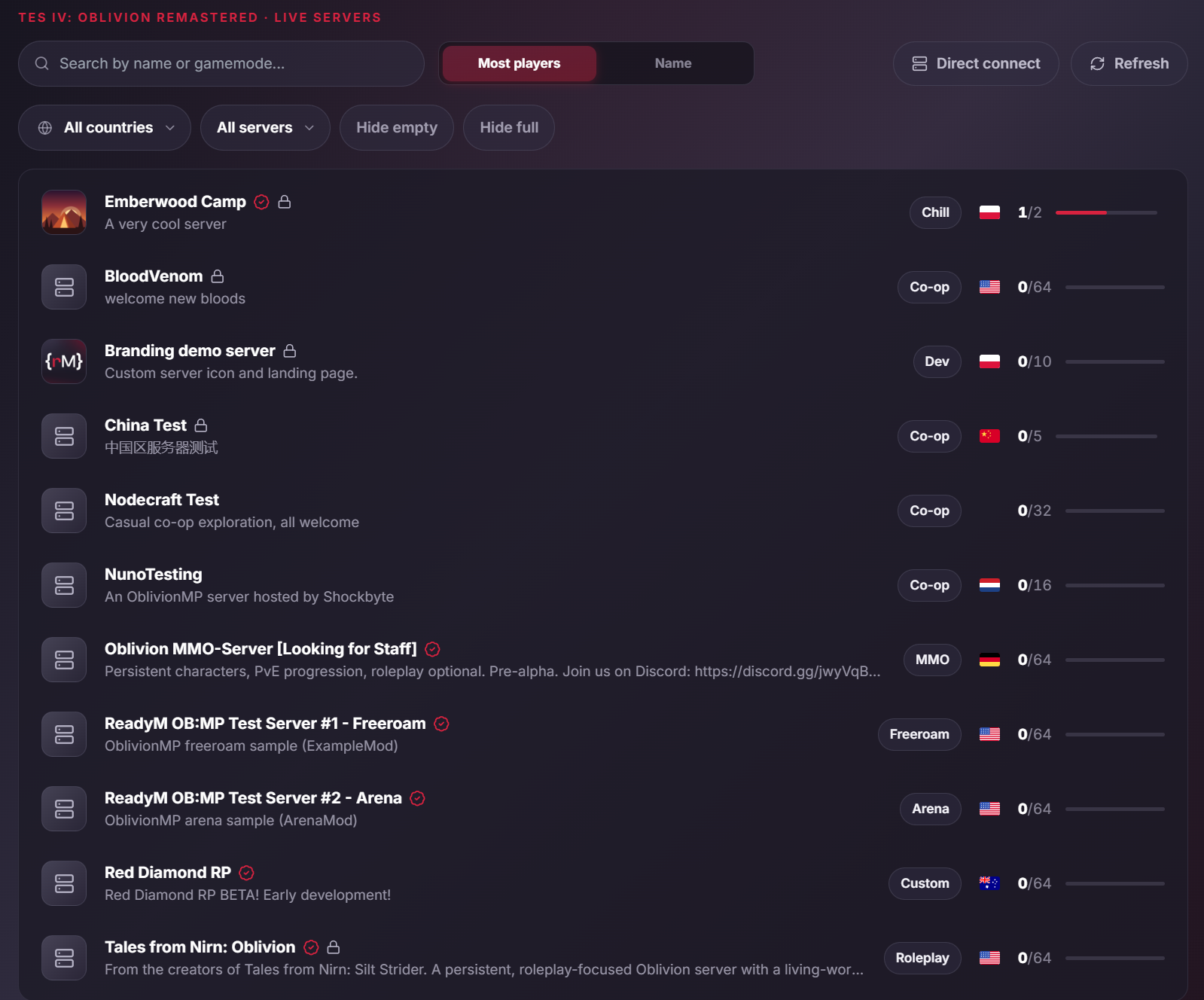
Adding an icon
Put one image named icon.png, icon.jpg, icon.jpeg or icon.webp in the branding/ folder.
The icon is part of your server's public listing, so it only shows while ServerList:Enabled is true.
What the icon must be
| Rule | Value |
|---|---|
| Format | PNG, JPEG or WebP, matching the file's extension |
| Shape | Square |
| Size | From 64x64 to 512x512 pixels; 256x256 looks sharp on every screen |
| File size | At most 256 KiB |
SVG and ICO files are not accepted. Keep exactly one icon.* file: with more than one, none is used.
When the server starts, and whenever the file changes, it checks the icon and logs a warning naming the file and the rule it breaks, if any.
How it reaches players
Your server never sends the icon to players. It uploads the icon to ReadyM once, and players load it from ReadyM's servers. Players who browse the list don't connect to your server until they open its Join panel.
- Changing it: replace the file. You don't need to restart: the server notices the change, and the new icon shows in the list within about a minute.
- Removing it: delete the file. The list goes back to the default placeholder within about a minute.
Server card
A server card is your server's own landing page in the Launcher. When a player opens your server's Join panel, the card is shown above the Join button: your layout, art, colors, rules, events and links, written in plain HTML and CSS.
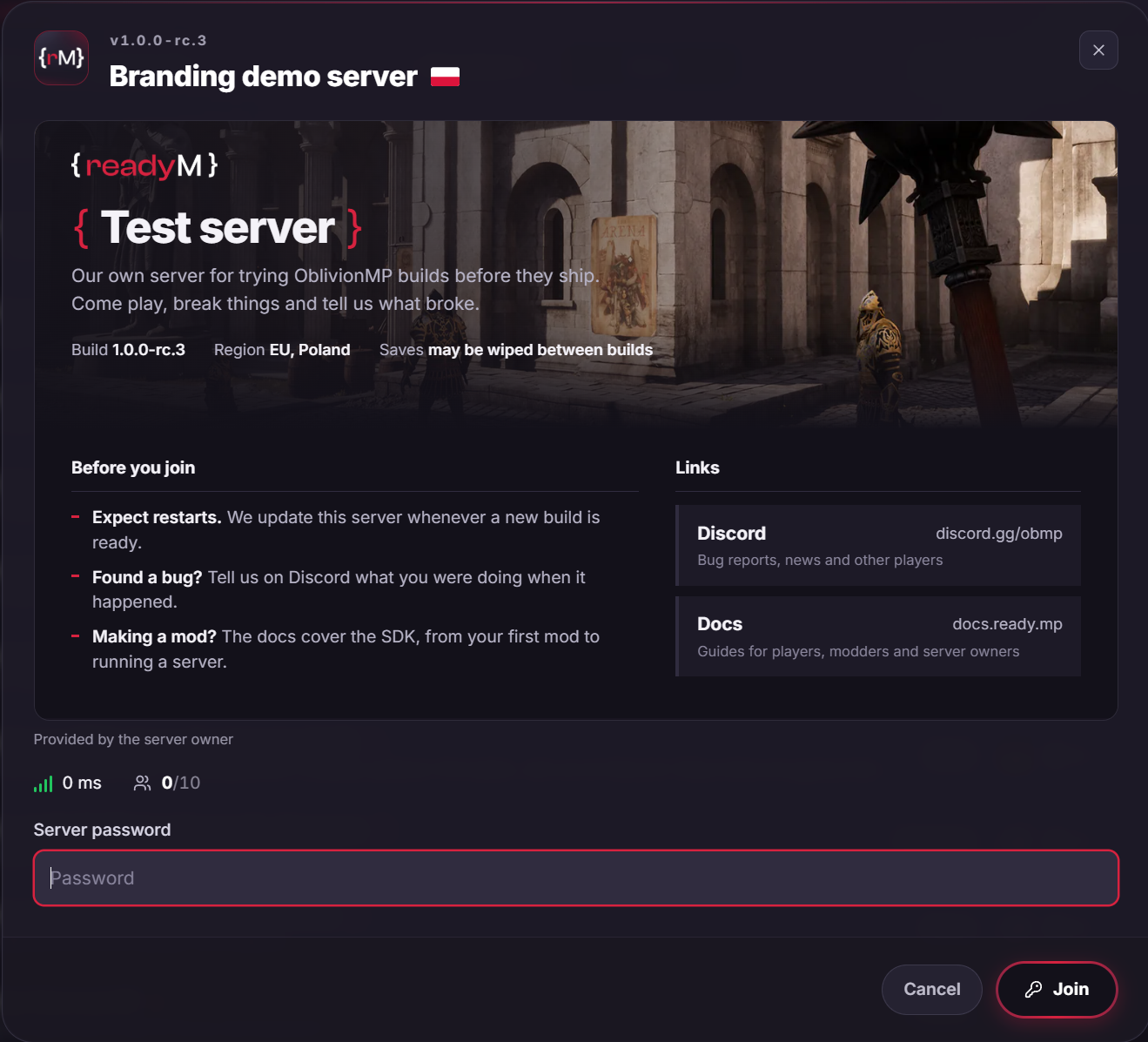
Cards have no scripts. Everything else a page can do with HTML and CSS, including custom fonts and animations, works within the rules below.
Adding a card
Create a card/ folder in branding/ and put an index.html in it. Any images and fonts the card uses go in the same folder, as in the tree at the top of this page.
A card can be just index.html. A minimal one:
<style>
  .card { padding: 20px 24px; }
  .card h1 { margin: 0 0 8px; font-size: 26px; }
  .btn {
    display: inline-block;
    padding: 8px 16px;
    border-radius: 999px;
    background: #d7223f;
    color: white;
    text-decoration: none;
  }
</style>

<div class="card">
  <h1>Bob's tavern</h1>
  <p>Casual co-op exploration, all welcome. Events every Friday evening.</p>
  <a class="btn" href="https://discord.gg/your-invite">Join our Discord</a>
</div>
The server reads the card on every request, so you don't need to restart after editing it. Close and reopen the Join panel in the Launcher to see your changes.
For a quick preview while you write, open index.html straight from the folder in a web browser. The Launcher is the final word, since it removes everything the rules below don't allow.
Network
The Launcher fetches the card over HTTP from your server's public address (PublicHost and PublicPort from the server list settings), on the same port as the admin panel. If you forward ports, forward TCP on PublicPort to Server.Port as well as UDP. Otherwise players see the panel without your card.
How the card is shown
- Size. The card fills a box about 830 pixels wide. Its height follows the size of the player's Launcher window, from 200 to 460 pixels, and the box scrolls vertically when your card is taller. Anything wider than the box is cut off. Put what matters most in the top 200 pixels.
- Defaults. The card starts from a clean slate, not from the Launcher's styles: 13 px Inter in a light grey (
#e8e6ef) over the panel's dark background. Images are never wider than the box. - Around it. The server name, ping, player count, password field and Join button are the Launcher's own and stay outside the card. A label under the card tells players the content comes from the server owner.
- No card, or one that can't be shown: the Join panel shows your
Descriptionfromconfig.jsoninstead. Keep a short description set for players on older Launchers and for when the card can't load.
What you can use
HTML
These elements are kept:
| Kind | Elements |
|---|---|
| Text | p, h1 to h6, strong, em, b, i, u, s, small, mark, sup, sub, code, pre, kbd, q, cite, abbr, time, blockquote, br, hr |
| Layout | div, span, section, article, header, footer, nav, main, aside, figure, figcaption |
| Lists | ul, ol, li, dl, dt, dd |
| Tables | table, caption, thead, tbody, tfoot, tr, th, td |
| Media and links | img, a |
Kept attributes: class, id, title, alt, width, height, colspan, rowspan, style, src on images and href on links. Every other attribute is removed, including all on... event handlers, target and srcset.
These elements are removed together with their content: scripts (script, noscript), embedded content (iframe, object, embed), forms and their controls (form, input, button, select, textarea), video, audio, canvas, inline svg and math, dialog, template, and page-level tags such as meta, link, base and title. Use an <a> styled as a button for buttons, and put SVG art in an <img>.
Any other element, a label or a custom tag for example, is unwrapped: the tag goes, its text and children stay.
CSS
Write CSS in <style> elements or style attributes. Modern CSS works as in a current Chromium browser: flexbox, grid, clamp(), min(), max(), aspect-ratio, color-mix(), custom properties, layered backgrounds, transforms, transitions, animations and :hover effects.
What is removed:
- URLs that are not card files. A declaration whose
url()points anywhere but a file in yourbranding/card/folder is dropped whole. See Images and fonts. - Functions that can load from text:
image-set(),-webkit-image-set(),cross-fade(),image(),element()andpaint()drop their declaration. - At-rules other than
@media,@keyframesand@font-face.@import,@supports,@layer,@container,@propertyand@pageare removed. - Rules aimed at the card's container: selectors using
:host,:host-context()or::slotted().
Your CSS only styles the card: it can't reach the Launcher, and even position: fixed stays inside the card's box.
Write url() directly in a property rather than in a shorthand that also uses var(), for example background: var(--tint) url("art/bg.webp"). The browser only resolves such a shorthand when it renders the card, too late to check its URL, so the whole rule is dropped. Splitting it into background-color: var(--tint) and background-image: url("art/bg.webp") works.
Animations
CSS animations and transitions always run.
Images and fonts
Images (<img src>) and CSS URLs (url(), in backgrounds and in @font-face) must be paths relative to the branding/card/ folder, such as logo.png or fonts/title.woff2.
Not allowed: absolute URLs, // URLs, data: URLs, paths starting with /, ./ or ../, and paths with ?, # or \. A card loads nothing from anywhere else, so it can't track the players who open it.
Supported file types:
| Kind | Types |
|---|---|
| Images | PNG, JPEG, WebP, GIF, AVIF, SVG |
| Fonts | WOFF2 |
@font-face {
  font-family: "Title";
  src: url("fonts/title.woff2") format("woff2");
}

.card h1 { font-family: "Title", sans-serif; }
An SVG works as an image only (in <img> or a CSS background). It runs no script there and loads nothing.
Links
A card's buttons are links (<a href>) styled however you like. A link must be an https:// URL with a domain name, up to 2,000 characters. Other links have their href removed: http://, relative links, IP addresses, localhost, URLs with a user name or password, and other schemes such as mailto:.
Links open in the player's web browser, never inside the Launcher. Before opening one, the Launcher shows the player the link's real domain and full URL and asks them to confirm. Links to these domains and their subdomains open straight away:
discord.ggdiscord.comyoutube.comtwitch.tv
Limits
| Limit | Value |
|---|---|
index.html | 256 KiB |
| One image or font | 2 MiB |
| All images and fonts together | 8 MiB |
| Images and fonts used | 50 |
Loading index.html | 3 seconds |
| Loading the whole card | 10 seconds |
Save index.html as UTF-8. If index.html is too big or too slow, players see the description instead. An image or font past a limit is left out on its own, and the rest of the card still shows.
When the server starts, it checks the branding/card/ folder and logs a warning for anything the Launcher won't accept: a missing index.html, a file over a limit, or a file of an unsupported type.
Icons and cards come straight from your server, with no review by ReadyM. The ReadyM Terms of Service apply to them like to your server's name and description, and violations may get your server removed from the public list or your account banned.